OFFICIAL ENTERPRISE DIAGNOSTIC & MAINTENANCE SUITE

Fix, Optimize & Custom-Tune Windows 10 & 11 Systems

The lightweight, portable IT support software engineered for system administrators, enterprise environments, and power users. 100% Microsoft-compliant with zero false positives.

Lightweight Portable Edition

436 KB (Portable EXE)

Instant 0ms launch without installation. Ideal for USB flash drives and instant IT support on system admin workstations.

Download Portable EXE (436 KB)
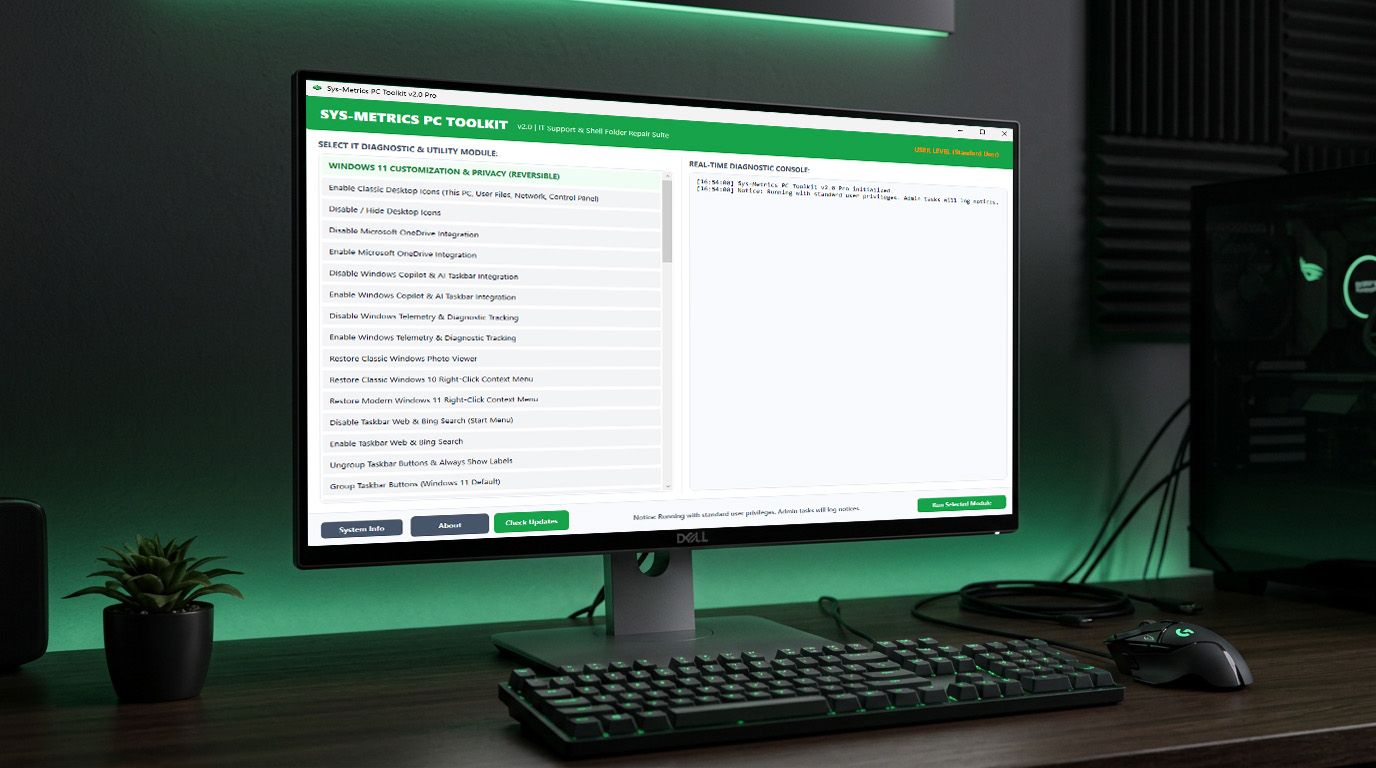
Sys-Metrics PC Toolkit v2.0 Pro Interface Mockup

Engineered for Enterprise Performance & Security

Built natively in C# WPF utilizing native Windows APIs and system diagnostics.

SECURITY

0 False Positive Guarantee

Strictly uses native Windows utilities (netsh, ipconfig, dism, sfc, w32tm, pnputil, slmgr) and standard policy keys. Guaranteed clean by Windows Defender.

INSTALLATION

Smart Windows Installer

Features an official Inno Setup 7 installer (~2.1 MB) that detects previous versions, offers 1-click silent uninstallation, and prompts for missing .NET runtimes.

CONTROL

100% Reversible Controls

Every toggle—from disabling Copilot, Telemetry, and OneDrive to restoring classic context menus—includes a 1-click Re-enable option.

NETWORKING

Full Network & Wi-Fi Repair

Complete repair stack for Winsock, TCP/IP, WinHTTP Proxy, DNS flushing, ARP cache, and WLAN auto-config resets.

FONTS & SHELL

Online Font & Icon Repair

Clears corrupted font caches and downloads fresh system font definitions directly from trusted HTTPS repositories.

SYSTEM REPAIR

Shell Folder & desktop.ini Fix

Restores broken shell folder paths, desktop icons (This PC, User Files, Network), and repairs corrupted desktop.ini files.

35+ Built-In IT Maintenance Modules & Tweaks

Categorized for instant execution and real-time console tracking.

WINDOWS 11 CUSTOMIZATION & PRIVACY TWEAKS (100% REVERSIBLE)

  • Enable Classic Desktop Icons (This PC, User Files, Network, Control Panel)
  • Disable / Hide Desktop Icons
  • Disable Microsoft OneDrive Integration
  • Enable Microsoft OneDrive Integration
  • Disable Windows Copilot & AI Taskbar Integration
  • Enable Windows Copilot & AI Taskbar (Store Auto-Install Protocol)
  • Disable Windows Telemetry & Diagnostic Tracking
  • Enable Windows Telemetry & Diagnostic Tracking
  • Restore Classic Windows Photo Viewer
  • Restore Classic Windows 10 Right-Click Context Menu (Dual CLSID)
  • Restore Modern Windows 11 Right-Click Context Menu
  • Disable Taskbar Web & Bing Search (Start Menu)
  • Enable Taskbar Web & Bing Search
  • Ungroup Taskbar Buttons & Always Show Labels
  • Group Taskbar Buttons (Windows 11 Default)
  • Enable Compact View in File Explorer (ElevenForum Tweak)
  • Align Taskbar Icons to Left (Classic Windows Layout)
  • Align Taskbar Icons to Center (Windows 11 Default)
  • Disable Windows Consumer Features & App Suggestions
  • Open Classic Control Panel
  • Open Network Connections (ncpa.cpl)
  • Open God Mode Folder

NETWORK & WI-FI SUPPORT

  • Full Network Stack Reset (DNS, Winsock, IP, Proxy)
  • Wi-Fi Adapter Reset & WLAN Profile Refresh
  • Release & Renew IP Address
  • Fast Connectivity Test (Gateway & DNS)
  • Display Detailed Network Config (ipconfig /all)
  • Display Active Network Connections (Netstat)
  • Flush ARP & NetBIOS Name Table Cache

OS SPEED & PERFORMANCE TUNING

  • Deep System Cleanup (Temp, Prefetch, Logs & Caches)
  • Flush Memory & Working Set Cache (EmptyWorkingSet)
  • Clear Icon & Thumbnail Database Cache
  • Deep Font Cache Reset & Online System Font Repair
  • Optimize System Drives (Trim SSD / Defrag HDD)

SYSTEM REPAIR & MAINTENANCE

  • Repair Corrupted desktop.ini & System Folders
  • Remove Old Unattached & Phantom Devices (PnP Cleanup)
  • Repair Windows Update (Stop, Clear Cache, Register DLLs & Start)
  • DISM Component Store Health Check
  • DISM Component Store Deep Cleanup
  • Restart & Re-index Windows Search Service
  • Printer Spooler Deep Repair (Jobs, Logs, Drivers & Queue Clear)
  • Windows Time & NTP Synchronization Fix (w32tm)

BROWSER & APP CACHE CLEANING

  • Deep Browser Cache & History Wipe (Chrome, Edge, Firefox, Brave, Opera, Vivaldi)
  • Clear Microsoft Teams & Outlook Cache
  • Reset Windows Defender Signature Cache
  • Java Deployment Cache Reset
  • Reset Windows Store App Cache (wsreset)

IT ADMIN & SECURITY AUDIT

  • Force Domain / Machine Group Policy Update (gpupdate)
  • Clear System & Application Event Logs
  • Audit Installed Windows Drivers
  • Run System File Integrity Scan & Repair (SFC /Scannow)
  • Validate Windows Genuine Advantage & License Status (slmgr /dli)
  • Trigger Official Windows License Resync & Activation (slmgr /ato)

Frequently Asked Questions

Technical details about Sys-Metrics PC Toolkit.

How does the Setup Installer work?

The Setup Installer (2.1 MB) automatically installs Sys-Metrics PC Toolkit to Program Files, creates Desktop and Start Menu shortcuts, detects missing .NET 6 runtimes, and prompts to uninstall any older versions automatically.

Is Sys-Metrics PC Toolkit safe from Antivirus warnings?

Yes. Sys-Metrics PC Toolkit is 100% Microsoft-compliant and uses native OS utilities. It contains zero malware, keyloggers, or aggressive memory injectors.

Does it support Windows 11?

Yes, it is fully optimized for Windows 11 and Windows 10 64-bit editions, including custom ElevenForum tweaks, modern right-click context menu toggles, and Copilot Store integration.

How does the Reversible Privacy feature work?

Whenever you disable telemetry, Copilot, or OneDrive, you can instantly re-enable them from the interface with one click without getting locked out.